
Turnwave Caller ID & merchant features
Turnwave Caller ID shows who is calling before you pick up — using customers you already have in Turnwave, not your personal phone book. It is built for busy salons, barbers, and appointment-based businesses that want online booking, fewer no-shows, and a calmer front desk when the phone rings.
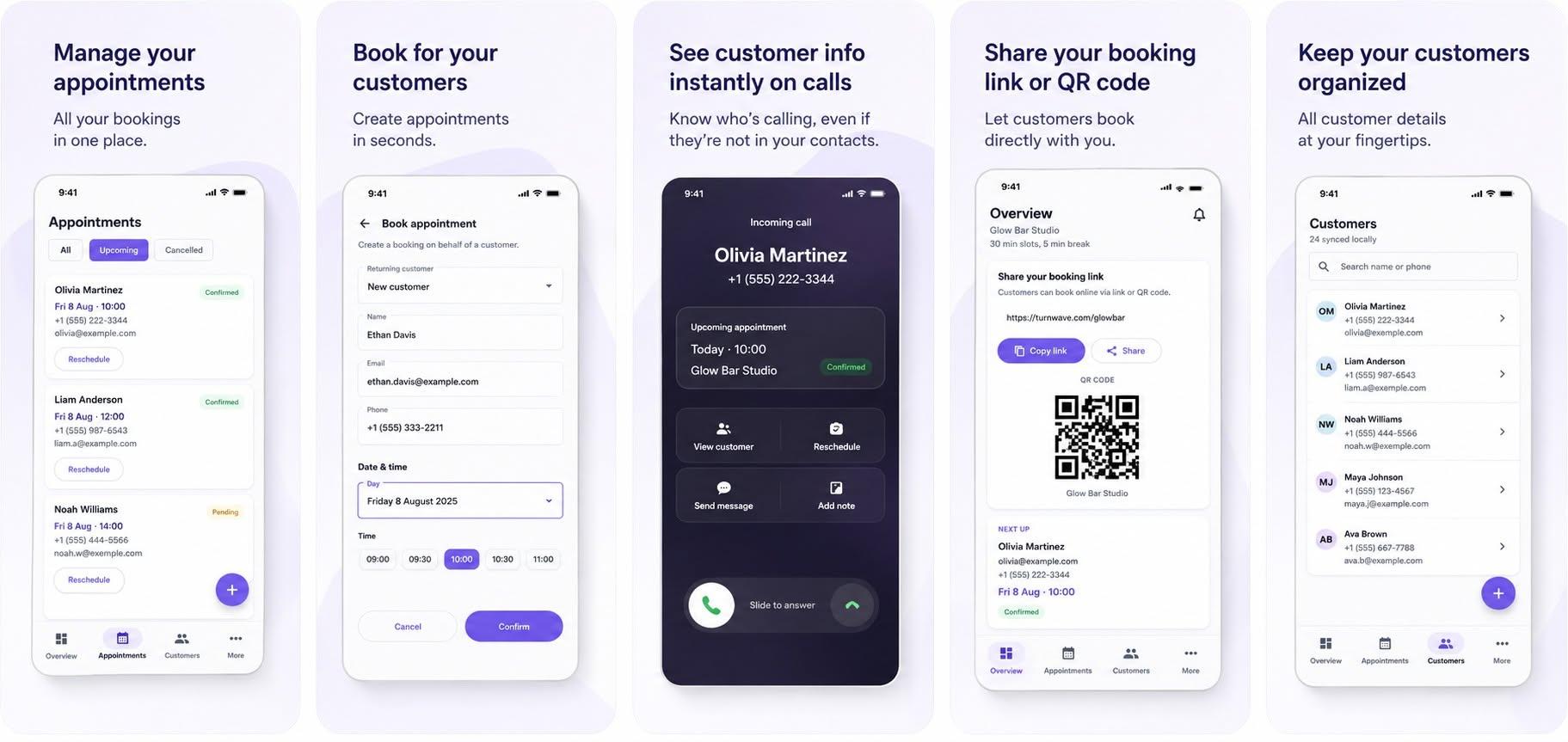
Turnwave Merchant app — from incoming call to booked appointment
Manage appointments, book walk-ins, see Caller ID with the customer's next visit on the lock screen, share your booking link or QR code, and keep every client in one place.
What is Turnwave?
Turnwave is an online booking and appointment platform for local businesses. Merchants get a personal booking page, shareable link, and QR code so customers can book available slots any time. Every booking and cancellation is confirmed by email. Optional SMS or WhatsApp plans send an automated reminder before the appointment to reduce no-shows.
You manage your business from the Turnwave web dashboard — schedule, appointments, customers, plan, and billing — and from the Turnwave Merchant Android app when you are on the shop floor. Caller ID is a standout mobile feature: it connects your phone calls to the customer data you already trust in Turnwave.
What is Turnwave Caller ID?
Turnwave Caller ID identifies known customers on incoming calls — even when they are not saved in your phone contacts. The center screen in the app preview above shows what you see on a ring: the customer name, their number, and their upcoming appointment at a glance.
When someone in your Turnwave customer list rings your business line, the merchant app can show:
- Customer name — matched from your synced Turnwave customers
- Phone number — the number calling in
- Visit history — how many appointments they have had and when they last visited
- Next appointment — upcoming date and time, in your business timezone
- Quick actions — book a new slot or open their appointment history without leaving the call flow
You do not need to manually save every client in your phone contacts. Customers enter Turnwave through online bookings, walk-in bookings you create in the dashboard or app, and stay available for Caller ID after a sync.
How Turnwave Caller ID works
Caller ID runs in the Turnwave Merchant app on Android. Here is the flow from setup to an incoming call:
- Sign in to the Turnwave Merchant app with your merchant account.
- Sync customers so your Turnwave customer list is stored on the device. The app refreshes data when you open it online.
- Complete Caller ID setup in the app — grant the Android permissions the feature needs (see below).
- Enable Caller ID once setup is complete.
- When a call arrives, Turnwave matches the incoming number against your synced customers and shows an on-screen card or notification.
- Tap Book appointment to pre-fill a quick booking for that customer, or View appointments to see their history and upcoming slots.
Lock screen and incoming-call display
On a locked phone, Turnwave can surface caller information as a full-screen popup or a high-priority heads-up notification with the same quick actions. This helps when you are with a client and cannot dig through your contacts app mid-ring.
Android permissions (and why they are needed)
Modern Android limits how apps can see incoming phone numbers. Turnwave Caller ID asks for only what the feature requires:
- Phone state — detect when a call starts and ends
- Caller ID & spam app role — the recommended way to receive the incoming number on current Android versions
- Call log (optional fallback) — helps resolve the caller number on some devices if the screening role alone is not enough
- Notifications — show caller info and keep the background service alive responsibly
- Full-screen on incoming calls — optional setting so caller ID can appear while the screen is locked
Caller ID is optional and can be turned off in the app at any time. Turnwave is not a replacement dialer — it enriches calls for businesses that already use Turnwave for bookings.
Why salons and barbers use Caller ID
Appointment businesses get a lot of phone traffic: reschedules, walk-in questions, and regulars who never save your shop number. Caller ID answers the most important question instantly — who is this? — and surfaces context that generic caller ID cannot:
- Recognize regulars without cluttering your personal contacts
- See if they already have a booking this week
- Book a follow-up in seconds if they want another slot
- Give a warmer greeting because you know their name
- Stay focused on the client in your chair while the phone rings
Combined with Turnwave's online booking link and reminders, Caller ID closes the loop between digital bookings and real-world phone conversations.
Full Turnwave feature list for merchants
Caller ID is one part of a platform designed for day-to-day shop operations. Here is what Turnwave includes:
Online booking & customer-facing
- Personal booking page with your business branding
- Short booking link and printable QR code
- Live availability based on your weekly schedule and blocked periods
- Customer self-service cancel and reschedule links
- Booking page embed for your website (domain allowlist in Advanced settings)
- Multi-language booking experience
- Times shown in your business timezone
Confirmations & reminders
- Email confirmation for every booking and cancellation
- Optional SMS or WhatsApp reminder before each appointment
- Configurable reminder timing per business
Merchant dashboard (web)
- Appointment calendar — view, create, reschedule, and cancel
- Customer list with contact details and history
- Weekly schedule, breaks, holidays, and blocked time
- Business timezone settings
- Plan and billing management
- Advanced embed and domain settings for developers
Turnwave Merchant app (Android)
- Overview of today's appointments
- Full appointment list with pull-to-refresh sync
- Customer directory with on-device cache for offline access
- Schedule view aligned with your business timezone
- Walk-in and phone bookings from the shop floor
- Caller ID — customer name and context on incoming calls
- Reschedule and cancel rules that respect your business calendar
Turnwave Caller ID vs saving contacts on your phone
Many stylists and barbers try to solve unknown callers by saving every client in their personal contact list. That breaks down quickly: staff change phones, numbers get out of date, and your personal contacts mix with business clients.
Turnwave keeps customers in one business system — the same place bookings and reminders already live. Caller ID reads from that list, stays in sync when customers book online, and does not require exporting contacts to each employee's private phone book.
Frequently asked questions
What is Turnwave Caller ID?
Turnwave Caller ID is a feature in the Turnwave Merchant app for Android. When a known customer calls your business phone, it shows their name from your Turnwave customer list, their visit history, and their next appointment — without saving every client in your personal contacts app.
How does Turnwave Caller ID work?
The merchant app syncs your Turnwave customers to the phone. On an incoming call, Turnwave matches the caller number against that list and displays an overlay or lock-screen notification with the customer name, appointment count, last visit, and next booking. You can book a new appointment or open their appointment history in one tap.
Do I need to save customers in my phone contacts?
No. Caller ID uses customers already stored in Turnwave from online bookings, walk-in bookings, and your merchant dashboard. You sync them once in the app — they do not need to live in your phone contact book.
Does Turnwave Caller ID work on a locked screen?
Yes. On supported Android devices, Turnwave can show caller information as a full-screen popup or a high-priority notification with quick actions while the phone is locked, after you allow the required Android permissions.
What permissions does Turnwave Caller ID need?
Turnwave Caller ID needs phone state access to detect calls, the Android Caller ID & spam app role and/or call log access to read the incoming number (Android restricts this for privacy), notifications, and optionally full-screen intent permission so caller info can appear on a locked screen.
Is Turnwave only a caller ID app?
No. Turnwave is an online booking and appointment platform for local businesses. Caller ID is one feature of the free Turnwave Merchant Android app, alongside appointments, customers, schedule management, and sync with your Turnwave web dashboard.
What types of businesses use Turnwave?
Turnwave is built for appointment-based local businesses such as barbers, hair salons, beauty studios, and similar service providers who want online booking, automated confirmations, optional SMS or WhatsApp reminders, and a simple way to manage the day from phone or desktop.
Does Caller ID work offline?
Yes, for known customers. After you sync customers to the phone, Caller ID can match incoming numbers from the local cache even when you are temporarily offline. Fresh customer data syncs when you are back online.
Get started with Turnwave
Register your business to get your booking link, dashboard access, and eligibility for the Turnwave Merchant Android app with Caller ID.
Register your business · View pricing · Developer embed docs · Privacy policy